

If you have collected LEGO Town buildings for years, a street can be as simple as laying several printed 32×32 road baseplates next to each other. Add a 2021-style LEGO City road module, however, and that familiar arrangement changes. The new surface sits at a different height, joins in a different way and no longer includes the same fixed stretches of roadside studs.
This is not a story about LEGO bricks suddenly becoming incompatible. It is about two different approaches to designing a city. Classic road baseplates provide a ready-made street plan; the newer modules make the street itself part of the construction. Understanding that distinction helps explain the history, the controversy and the most practical ways to combine generations.
What changed when LEGO City introduced new road plates in 2021?
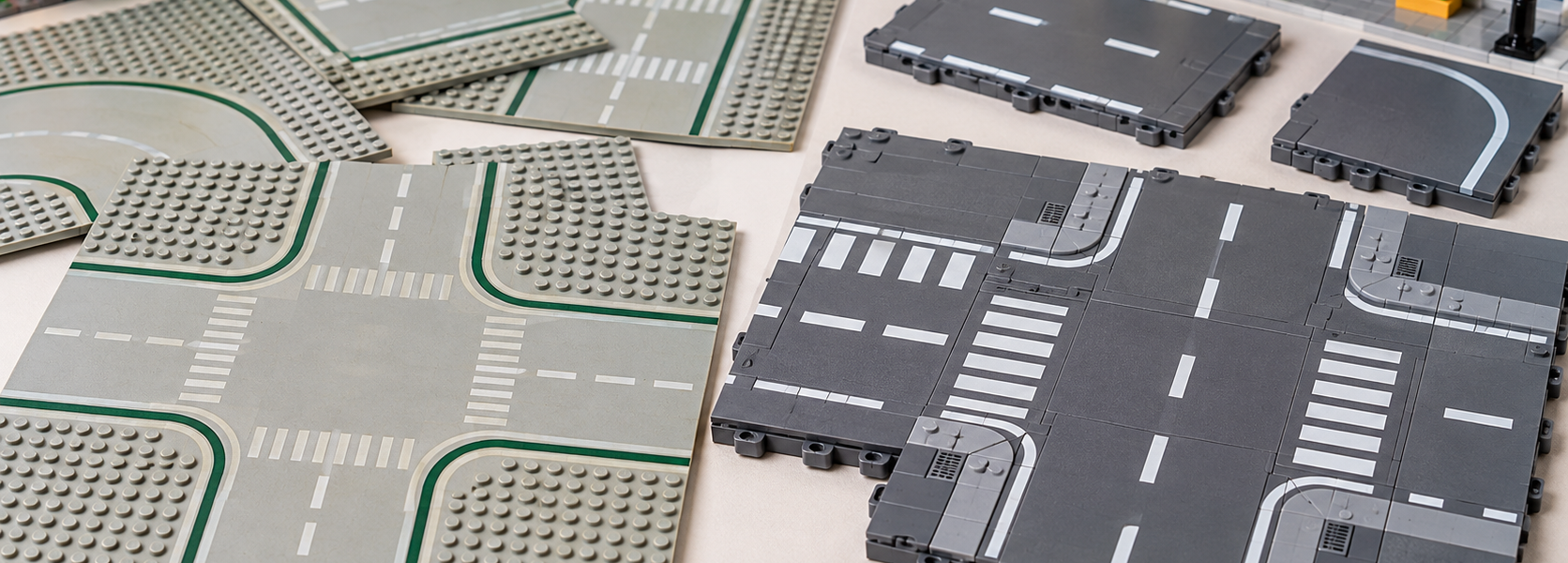
The clearest example is LEGO City 60304 Road Plates, released in 2021 with 112 pieces. Its road surface is built around four 16×16 modules and one 8×16 section featuring a printed pedestrian crossing. The set also includes slopes, lane-marking tiles and street accessories. The redesign was previewed by specialist publications in December 2020, before the 2021 product release; the two dates should not be confused.
Each large road module is two ordinary LEGO plates high, rather than being a thin traditional baseplate. Recessed areas along the edges accept 1×4 connector pieces, while 2×4 recesses allow additional tiles or plates, including road markings, to be installed. Their undersides have connection points that make them useful within a built-up structure instead of only as loose sheets on a table. The main 16×16 element is catalogued by BrickLink as 69958; the printed 8×16 crossing variant is catalogued as 71772pb01.
This construction is what makes the system modular. A builder can extend a road, add a median, change markings or use extra road sections for a wider street. It also means that the dimensions of a traditional 32×32 road baseplate do not translate directly into an interchangeable modern section. New Elementary’s detailed 60304 review examines the elements and shows examples of how they can be incorporated into larger layouts.
Classic road baseplates vs modern LEGO City roads
| Feature | Classic road baseplates | Modern road modules |
|---|---|---|
| Typical footprint | Printed 32×32 baseplate | Separate 16×16 and 8×16 sections, among other pieces |
| Construction | Thin, flexible baseplate | Thicker moulded elements, two regular plates high |
| Road markings | Largely fixed on the baseplate print | Many markings added with separate tiles; a crossing section is printed |
| Connections | Placed next to neighbouring baseplates on a shared surface | Joined with parts fitted into recessed attachment areas |
| Road width | Limited by the particular printed style | Can be varied by using additional modules |
| Curves and junctions | Available as recognisable printed road layouts | Require arranging modules and, for some shapes, custom solutions |
| Building integration | Well suited to traditional baseplate cities | Suited to raised construction, although old building levels may need adjustment |
There is a useful distinction here between LEGO System compatibility and street-level compatibility. Ordinary bricks, plates and tiles can help builders construct transitions between the two formats. What they cannot provide automatically is a matching surface height, continuous lane print or identical kerb and sidewalk geometry.
A short history of LEGO roads: from Town Plan to the 32×32 era
LEGO roads did not begin in 1978. According to the LEGO Group’s official history, the Town Plan of 1955 used a thin printed street layout on which children could arrange buildings and vehicles. The important change in 1978, with LEGOLAND Town, was the arrival of street building plates with printed roads and studs for attaching constructions directly to the streetscape.
For decades the 32×32 baseplate remained a familiar format, but its road widths, shoulders, background colours and line markings evolved. RenLUG’s illustrated Road Plate Styles By Year catalogue is a useful reference because it distinguishes individual styles and part numbers instead of treating all old roads as the same element.
| Approximate style period | Identifying feature |
|---|---|
| 1978–1986 | 32×32 roads with nine-stud shoulders; early grey road patterns |
| 1986–1996 | Seven-stud shoulders and revised prints |
| 1997–2003 | Eight-stud shoulders, including green-background styles |
| 2002–2003 | Six-stud shoulders and distinctive dark-road prints on green bases |
| 2005–2019 | Six-stud shoulders, dark bluish grey baseplates and white lane markings |
| From 2021 | Roads assembled from smaller, thicker moulded modules |
These are style ranges recorded by RenLUG, not exact worldwide changeover dates. Different designs overlapped, and older plates remained in collections long after newer patterns appeared.
This history explains an easily overlooked problem: even two classic road baseplates can look wrong together. If the shoulders differ by two or three studs, the painted roadway will not necessarily line up. Buyers sorting a mixed second-hand collection should therefore check the exact print and colour, not only the 32×32 size. BrickLink’s early road baseplate entry 606p02 is one example of how detailed those distinctions can be.
Why did LEGO redesign its roads?
The most useful explanation comes from LEGO itself, through a New Elementary interview published on 8 May 2021. The answers were provided jointly by the LEGO City and Element Design teams. They reveal three practical design considerations rather than a simple preference for a newer look.
Large baseplates constrained packaging
Traditional road baseplates were physically large in relation to the set they might accompany. The designers explained that the size of a baseplate restricted which product boxes could accommodate it. Smaller road modules could appear in more ordinary City sets without requiring packaging designed around a single oversized part.
Traditional baseplates were awkward to build across
The old road bases were produced using a different forming process from ordinary building plates. The LEGO team pointed to the difficulty of building continuously across a vacuum-formed baseplate and a regular plate. This matters when a street, sidewalk and building are intended to share one construction system rather than simply sit beside one another.
A modular platform offered more layout choices
The new parts were intended to support greater flexibility in road width, decoration, scale and connection. Designing the connectors was itself a substantial challenge. The concept was not a last-minute decision: according to the interview, an early version of the idea had been proposed more than a decade before the 2021 launch.
The change should not be confused with an announcement that all traditional LEGO baseplates were being discontinued. The interview also discusses LEGO’s response to fans’ concern about the broader future of studded baseplates. The redesign specifically affected the way City roads were provided; it did not make every older building base obsolete.
Can you connect old and new LEGO road plates?
Yes, in a planned layout—but not by treating them as plug-in replacements. There is no single universal connection that automatically reconciles every printed road width and every height difference. The sensible approach depends on whether the goal is to preserve a vintage display, bring a few newer streets into an existing city or rebuild the whole road network.
Option 1: Keep road generations in separate districts
For a large vintage Town collection, preserving complete older districts is often the least disruptive option. Classic curves, crossroads and T-junctions can remain visually consistent with the buildings and vehicles of their period. A newer district can use modular streets, with the boundary placed at a square, a parking area or a specially planned junction. This avoids scattering mismatched road markings across the entire layout.
Option 2: Set one reference height for the streets
If the road systems must meet, first decide on the intended elevation of the road surface and sidewalk. The thicker modern module cannot simply be laid beside a thin printed baseplate with an expectation of a flush connection. Supporting layers or an intentionally designed transition may be needed, and the printed widths must still be addressed. This is a planning method, not a claim that Brick Current has built or physically tested a particular adapter.
Option 3: Use a transition section rather than rebuilding everything
Another design approach is to treat the meeting point as its own small section of city. A custom junction or streetscape feature can conceal a change in lane width and provide space for a gradual visual transition. Whether a physical ramp or smooth join is achievable depends on the actual parts, supports and surface levels in the individual project. Builders should not assume that adjoining loose sections will form a rigid module that can be lifted without additional support.
How modern roads work with Modular Buildings
This is a major concern for adult builders because many LEGO Modular Buildings use traditional thin baseplates, while their sidewalks are already built up above those bases. A modern road plate placed directly on the same table is thicker than the adjacent baseplate, so existing buildings will not necessarily present the intended kerb height without adjustment.
New Elementary documented a particularly accessible solution in its December 2020 analysis of 60304: place the new road on the tabletop, then add one ordinary plate layer beneath the original baseplate of the Modular Building. In the specific construction illustrated there, that restores the relationship between the road and sidewalk. It works because of the geometry of a baseplate seated on ordinary studs; it should not be extrapolated to every custom sidewalk without checking the final profile.
The broader lesson is to align road surface, sidewalk and building entrance as a three-part relationship. Raising an entire row of buildings may be worthwhile for a permanent display. If only one intersection needs modernization, preserving the rest of the classic street grid may be simpler.
What about MILS and raised LEGO city layouts?
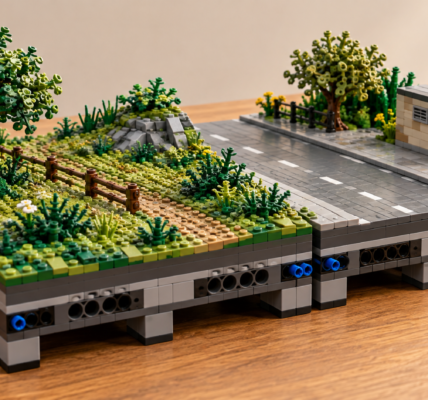
MILS stands for Modular Integrated Landscaping System. It is a fan-developed approach to building connected display modules, not an official LEGO standard. The L-Gauge modular standards reference describes the use of baseplates, structural layers and connections between neighbouring modules.
For builders using a MILS-like foundation, the newer road system offers a different construction route: because a road module is relatively thick and can connect from below, it may serve as part of the upper surface of a supported street module rather than requiring a separate, full layer of ordinary plates across the road. New Elementary provides an illustrated example of this arrangement, with the road and adjacent building areas carried on suitable support.
The caution is that MILS-based displays are not all constructed to exactly the same local street and sidewalk profile. A road module that looks right in one builder’s arrangement may sit too high or too low against another person’s scenery. Specify the intended visible levels and connection points before ordering large quantities of additional material. The purpose of this article is road-system compatibility; a full MILS construction guide is a separate subject.
Why do some collectors still prefer the old road baseplates?
There are practical reasons beyond nostalgia. A period-correct LEGO Town display has a distinctive visual language, and the road print is part of it. Classic bases include recognisable curves and junction patterns that may be central to an established town plan. Replacing them can mean changing the road network, moving buildings and losing the look of a particular era.
There is also a cost question. A large city can require many new road modules, connectors, finishing tiles and possible changes to building supports. The useful comparison is therefore the cost of converting an entire layout, not the price of one new module versus one vintage baseplate. Condition, colour, exact printing and regional second-hand supply affect the price of older parts; no single international price comparison stays accurate for long.
The classic format has trade-offs too. Much of each 32×32 plate is committed to a particular printed configuration, which can use substantial room along both sides of the roadway. If the available display space is limited, those fixed shoulders may be more restrictive than the newer design.
Where the modern LEGO City system has an advantage
For a city built from scratch, modular streets can make better use of a small table or shelf. A 16-stud-wide road section avoids committing the full 32-stud width of a classic baseplate to every stretch of road and shoulder. Extra pieces can be allocated where the layout actually needs sidewalks, dividers or wider lanes. This is particularly useful when planning around 6-wide and 8-wide vehicles, whose needs differ.
Decoration is also more flexible. Lane markings are partly formed from separate tiles, so builders can change some details without replacing an entire printed base. More elaborate road shapes, however, still demand careful planning. The original 60304 system did not provide a direct printed equivalent of every classic curved road baseplate; a modular system is flexible, but it is not automatically simpler for every curve.
For a play-focused City that is frequently rearranged, the thicker elements and smaller pieces may also be more convenient to handle. That is a design consideration, not a claim about a durability comparison conducted by this publication.
Which road system is right for your LEGO city?
| Builder or layout | Most useful starting point |
|---|---|
| Vintage Town collection | Preserve matching classic road patterns when period appearance is the priority. |
| Established Modular Building street | Check entrance and sidewalk heights before changing the road surface. |
| MILS-based display | Choose a reference ground level and design supporting modules around it. |
| Small City on a desk or shelf | Consider the smaller modular roads to avoid fixed oversized shoulders. |
| Layout rebuilt frequently | Modular road sections offer more scope to change markings, widths and junctions. |
| Mixed historical and modern city | Keep coherent districts and design intentional transitions between systems. |
When buying used road parts, verify the actual shape and printing rather than relying on a broad seller description. A classic baseplate’s shoulder width can matter as much as its colour; for modern roads, distinguish a basic unprinted module from a printed crossing variant. BrickLink identifiers such as 69958 and 71772pb01 are useful catalogue references, but they are not LEGO set numbers and should not be confused with the number 60304.
The real difference is the way a city is built
The development from printed 1978 road baseplates to the 2021 LEGO City modules was not simply a change from old to new plastic. It moved the street from a largely predetermined background into a more configurable part of the building system. That benefits builders who want flexible routes, custom markings and compact layouts, while introducing extra work for collectors whose cities already depend on classic 32×32 roads.
There is no requirement to replace a functioning road network just because a newer system exists. A good decision starts with what the display is meant to preserve: historical accuracy, the original buildings, limited space or freedom to rebuild. Once those priorities are clear, the choice between classic roads, modern modules and a carefully planned combination becomes much easier.
Sources and further reading
- The LEGO Group — LEGO City history, including the 1955 Town Plan and 1978 LEGOLAND Town transition.
- RenLUG — Road Plate Styles By Year, illustrated catalog of road styles and representative part numbers.
- New Elementary — LEGO City interview: the new Road Plates, 8 May 2021, primary statements from LEGO designers.
- New Elementary — 60304 Road Plates technical review, 15 December 2020, detailed element analysis and building-integration examples.
- Brickset — Review: 60304 Road Plates, 15 December 2020, independent set and system comparison.
- LEGO Group — official 60304 instructions listing, confirming the set number, 2021 date and 112-piece count.
- BrickLink — 606p02 classic road baseplate; 69958 road module; 71772pb01 printed crossing.
- L-Gauge — Modular Standards: MILS, reference for community-developed raised modules.