

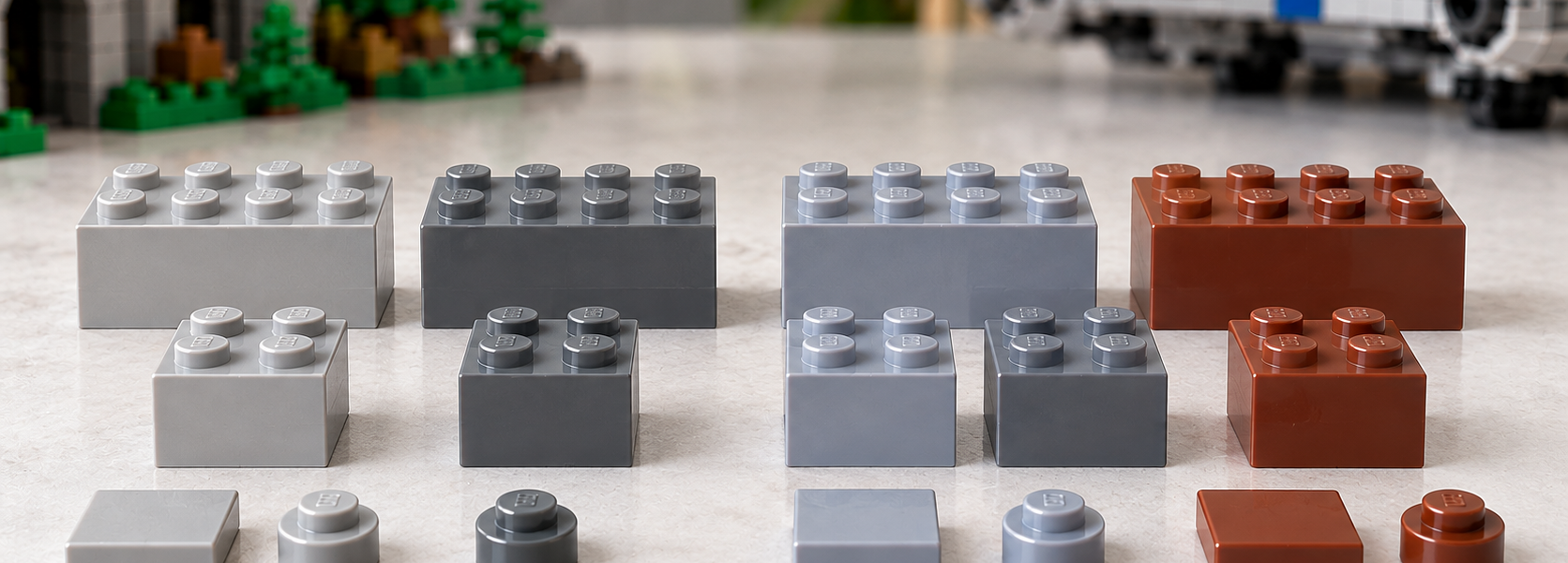
Old Gray vs Bluish Gray: Why LEGO Colors Changed Around 2004

Anyone restoring an older LEGO set eventually runs into the same problem: the replacement part fits perfectly, but the color does not. A modern gray brick can look noticeably cooler and more blue-toned next to parts from older Castle, Space, Technic or Star Wars sets.
That mismatch is not always caused by aging plastic. Around 2004, LEGO changed several long-standing color formulations. BrickLink tracks the older and newer shades as separate catalog colors, which is why the distinction still matters so much on the aftermarket.
Old gray and bluish gray are genuinely different colors
BrickLink separates classic Light Gray and Dark Gray from the newer Light Bluish Gray and Dark Bluish Gray.
The word “bluish” is descriptive rather than decorative. The newer grays have a cooler tone and a subtle blue cast compared with the older, more neutral shades. When parts from both eras sit next to each other, the difference is usually easy to see.
The same transition affected brown. BrickLink distinguishes old Brown from the newer Reddish Brown, which is warmer and more red-toned.
Why 2004 is only an approximate cutoff
Collectors often refer to this as the “2004 color change,” but the transition was not perfectly clean.
BrickLink catalog data shows the newer colors appearing in sets from 2003, while older grays and brown can still be found in inventories around and after the transition period. Production timing, inventory carryover and regional manufacturing can all blur the boundary.
For sets released roughly between 2003 and 2005, it is safer to check the specific inventory than to assume that the year alone tells you which shade is correct.
BrickLink names are not always LEGO’s official color names
This is one of the most common sources of confusion.
BrickLink uses Light Bluish Gray and Dark Bluish Gray because those names make the old/new distinction very clear to buyers and sellers.
LEGO’s own color terminology uses different names, including Medium Stone Grey and Dark Stone Grey. In other words, the BrickLink labels are aftermarket catalog terms rather than the exact internal LEGO names.
If you are buying parts on BrickLink, the simplest approach is to stick to BrickLink’s color names and color IDs throughout the search.
Why this matters when restoring vintage sets
Gray dominates many older themes. Castle walls, classic Space structures, Technic frames and early Star Wars vehicles can all use large numbers of gray elements.
Swapping one old Light Gray part for a modern Light Bluish Gray equivalent may be mechanically perfect but visually obvious. The replacement can stand out immediately, especially on broad surfaces or symmetrical assemblies.
For a play copy, that may be completely acceptable. For a collector trying to restore the set to its original inventory, the exact shade matters just as much as the part number.
The same mold can exist in both color eras
The color change did not necessarily change the physical design of the part. Common bricks, plates and tiles were produced in both the old and new gray families.
That is why mistakes are easy. Two parts can have the same geometry and the same design ID while belonging to different color generations.
Without a known reference part, inventory data, or a reliable seller description, the difference can be easy to miss in photographs.
How to tell old gray from bluish gray
The most reliable method is direct comparison with a part whose color you already know.
- Light Gray looks more neutral and slightly warmer.
- Light Bluish Gray looks cooler and subtly blue.
- Dark Gray is more neutral.
- Dark Bluish Gray has a cooler cast.
Online photos are not always reliable because lighting, white balance and part aging can distort gray tones. For restoration work, the set inventory and a physical comparison are much safer.
Brown changed too
The gray transition gets most of the attention, but old Brown was also replaced by Reddish Brown.
The difference is especially obvious when both shades are used in the same model. Vintage builds with wooden structures, terrain or brown detailing can look inconsistent if parts from both generations are mixed.
The transition years are the hardest
Sets from around 2003–2005 deserve the most care because both generations of colors can appear in overlapping catalog years.
For those sets, do not rely only on the release year. Check the exact inventory on BrickLink or another trusted database, and confirm the listed color before buying replacements.
This is one of those LEGO history details that barely mattered to many children at the time but matters enormously to collectors today. A part can be the correct shape and still be the wrong restoration choice simply because it belongs to the wrong color generation.